Your containers. One step ahead.
Know where each container is, which ships are late, and how many free days are left. Act before demurrage starts.
Container and BL tracking for importers, exporters and freight forwarders.
 Example data
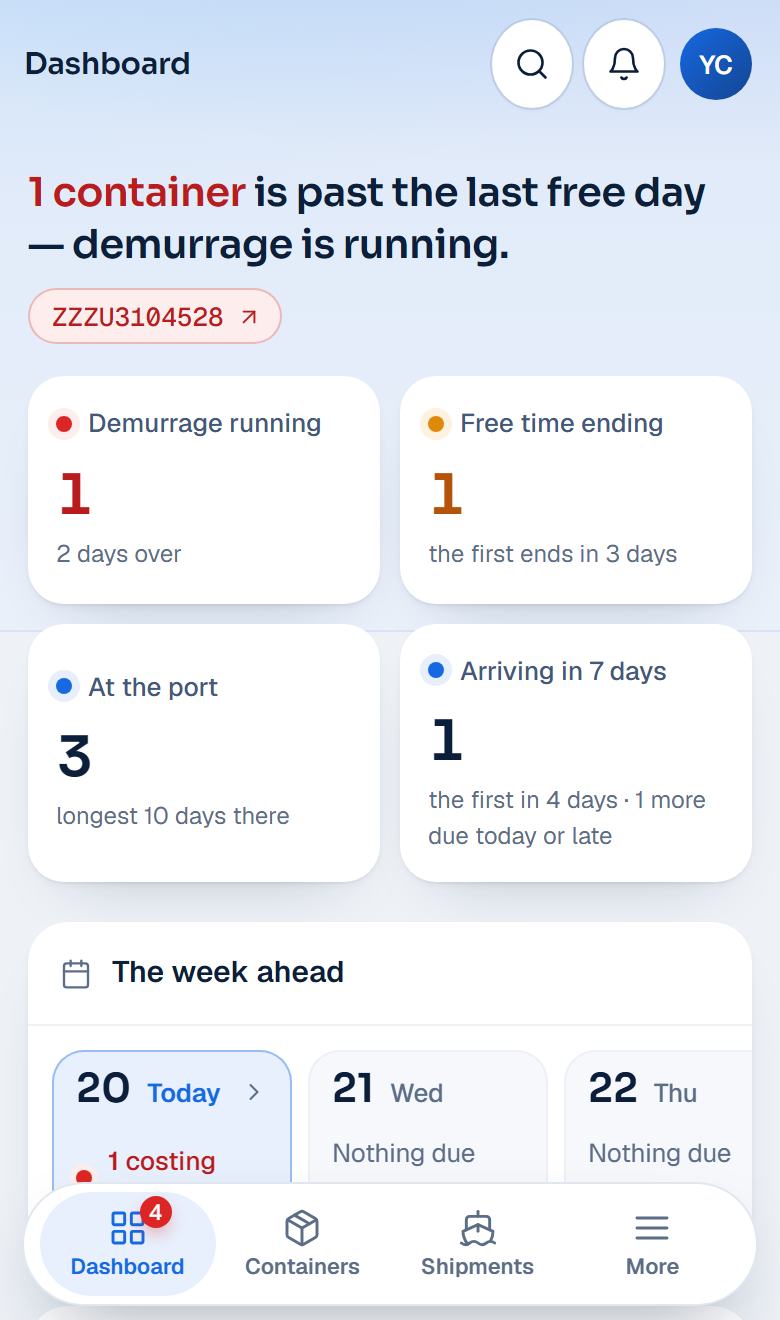
Start your day with what needs you.
Then the rest, in the order you need it.
- 1The red line
The containers past their last free day, each one a click away.
- 2The week ahead
What arrives, and whose free days end, day by day.
- 3Needs attention
The few containers that need you, most urgent first.
- 4Four counts
Paying demurrage now. Free days ending soon. Waiting at the port. Arriving this week. Click a count to see those containers.
Most containers need nothing from you. Three moments do.
SailPing keeps the quiet ones quiet, and puts these three first.
The ship is past its ETA
Its expected arrival date (ETA) has passed and it has not arrived. When the shipping line sends a new date, you see how many days it slipped — so the truck and the customs documents can move with it.
The free days are counting down
Once it is unloaded, the clock that matters is its last free day. SailPing counts it down on your dashboard and on the container, and sends an email reminder in the last three days.
The free days are gone
Still at the port after its last free day? Demurrage usually adds a charge for every extra day. It stays in red at the top of your dashboard, with how many days it is over, until the container leaves.
Add a last free day yourself, or it comes from the shipping line when the line sends one.
Everything about one container, on one page.
Open any container and see its whole voyage, built from what has already happened.
- Where it is now — the place of its latest real event, never a guess.
- How far along — 0% until it really sails, 100% when it really arrives.
- Every event, in order — in the port's own local time, where it is known.
- The ship, the voyage and the ETA — and how many days the ETA has moved.
- Its documents, notes and tags — kept with the container they belong to.
Tracking by bill of lading (BL)? Its containers come together on one shipment page.
- ShanghaiLoaded Sep 24
- ColomboChanged ships Oct 8
- Jeddah IslamicArrived Oct 16
- Last free day
- Oct 23 · in 3 days
- ETA
- Oct 16 ETA moved +2 days
- Vessel
- EXAMPLE BREEZE
- Oct 17 · 07:40 UTC+3Discharged at Jeddah Islamic
- Oct 16 · 22:15 UTC+3Vessel arrived at Jeddah Islamic
- Oct 10 · 18:05 UTC+5:30Departed Colombo on EXAMPLE BREEZE
- Oct 8 · 09:30 UTC+5:30Discharged at Colombo, to change ships
- Sep 24 · 16:50 UTC+8Departed Shanghai on EXAMPLE MERIDIAN
Add containers the way you already work.
Paste a list. Upload a sheet. Add a BL. Export your data whenever you need it.
- Type or paste container numbers — one, or a whole list at once.
- Add a BL (bill of lading) — and choose which of its containers to follow.
- Import an Excel or CSV sheet — match its columns to your own fields once; next time the matching is remembered.
- Your own fields on every row — PO number, warehouse, clearing agent. Save the views you use, and export the rows on your screen with every field.
- 2 containers to add
- ZZZU 123456 4
- ZZZU 654321 0
- 1 mistyped
- ZZZU 123465 4One character in it is wrong — the check digit does not match.
Every number is checked as you add it. If the last digit is wrong, we tell you at once and do not track it.
Your customers, your containers, your name on it.
All your customers. All their containers. One organised list — and each customer sees only their own.
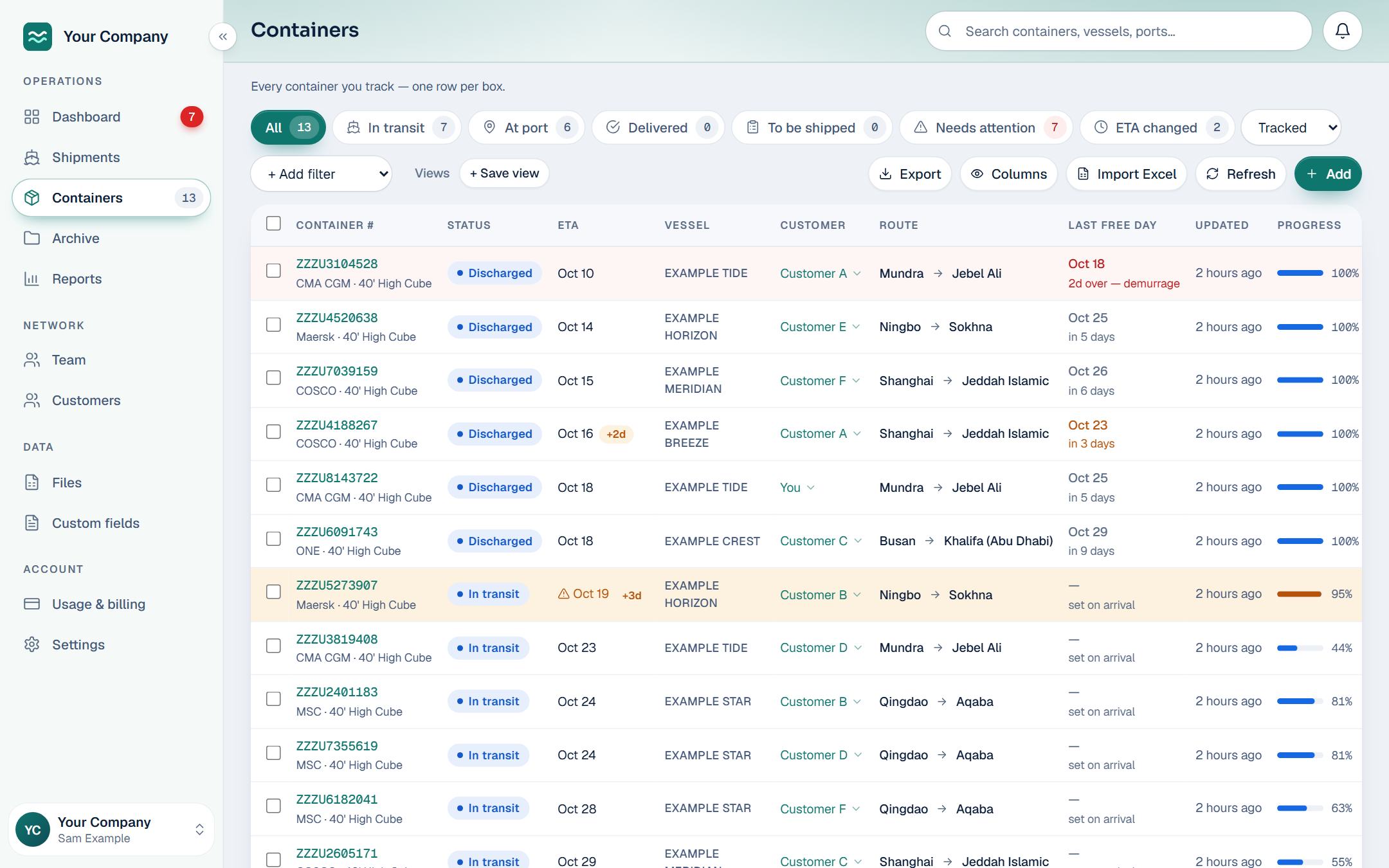
1Your list, in your brand. The Customer column shows whose each container is.
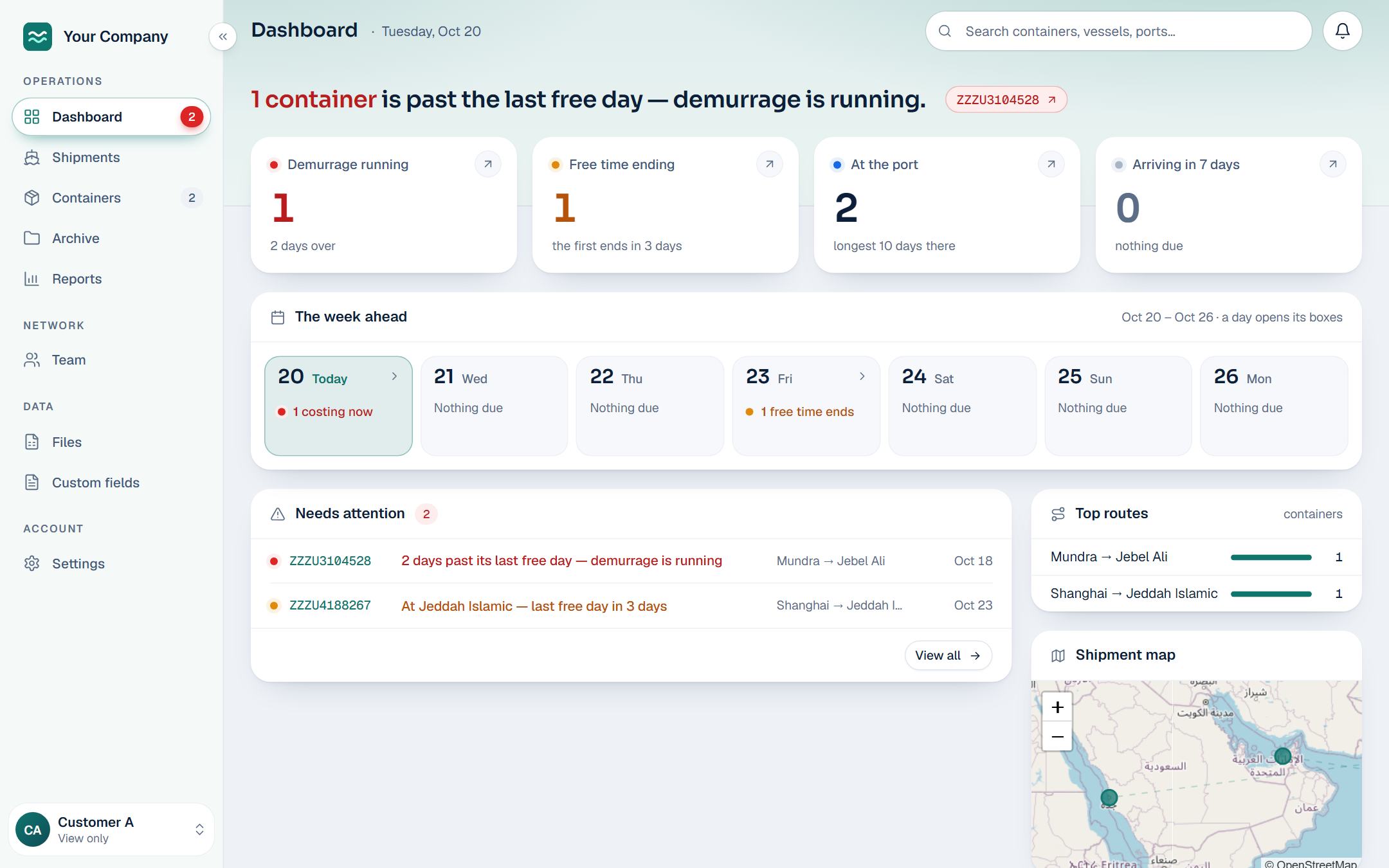
2What your customer sees: your brand, and only their own containers.
- Invite your customers — they sign in and see only the containers you give them. They see where their containers are; only you add, stop or reassign them.
- Assign a container to a customer — right from the list you already work in.
- Your notes and tags stay yours — your customer never sees them.
- Your team — account managers, members who add and track containers, and viewers who only look.
- Your brand, on request — your name, logo and style, on your own address on SailPing.
Want SailPing under your own name and domain?
White-label is available: your customers see your brand, under your domain.
Per container, per month.
Many customers, or your own name on it?
See how white-label and branding work.
Questions? Contact salesHow do I get an account?
Press Request access and create your account at once. Nothing is switched on until we approve it, and until then you can look around with example containers. We agree your price with you before we switch it on. Want to talk first, move many containers, forward for others, or want your own name or domain? Contact sales.
What does it cost?
A price per container, per month, agreed with you before your account is switched on.
What can I track?
Add containers by container number, or add a bill of lading (BL) and choose which of its containers to follow.
Which shipping lines can it follow?
We follow 180+ ocean shipping lines, and most leased and shipper-owned containers too. The first lookup of a container can take a few minutes.
How often does it check?
About every six hours, and every container shows when it was last updated.
Will it warn me before demurrage starts?
Yes. When a container has a last free day, typed by you or sent by the shipping line, SailPing counts it down. It sends an email reminder in the last three days. If the day passes, the container turns red at the top of your dashboard. No last free day yet? Add it on the container.
I'm a freight forwarder. Can my customers see their containers?
Yes. Invite them and assign their containers; they sign in and see only theirs — in your brand, once we have set one up for you.
Who can see my information?
You and the people you invite — and, if a freight forwarder set up your account for you, that forwarder. Inside SailPing, only our own team, and only to run the service for you. We do not sell your information or use it for advertising. Two-step sign-in is available on every account.
Your containers. One step ahead.
Tell us about your business, and we will set you up.